
Large image files can slow down websites, increase storage requirements, and make image uploads unnecessarily difficult. Optimizing images before publishing them can significantly improve website performance while helping maintain good visual quality.
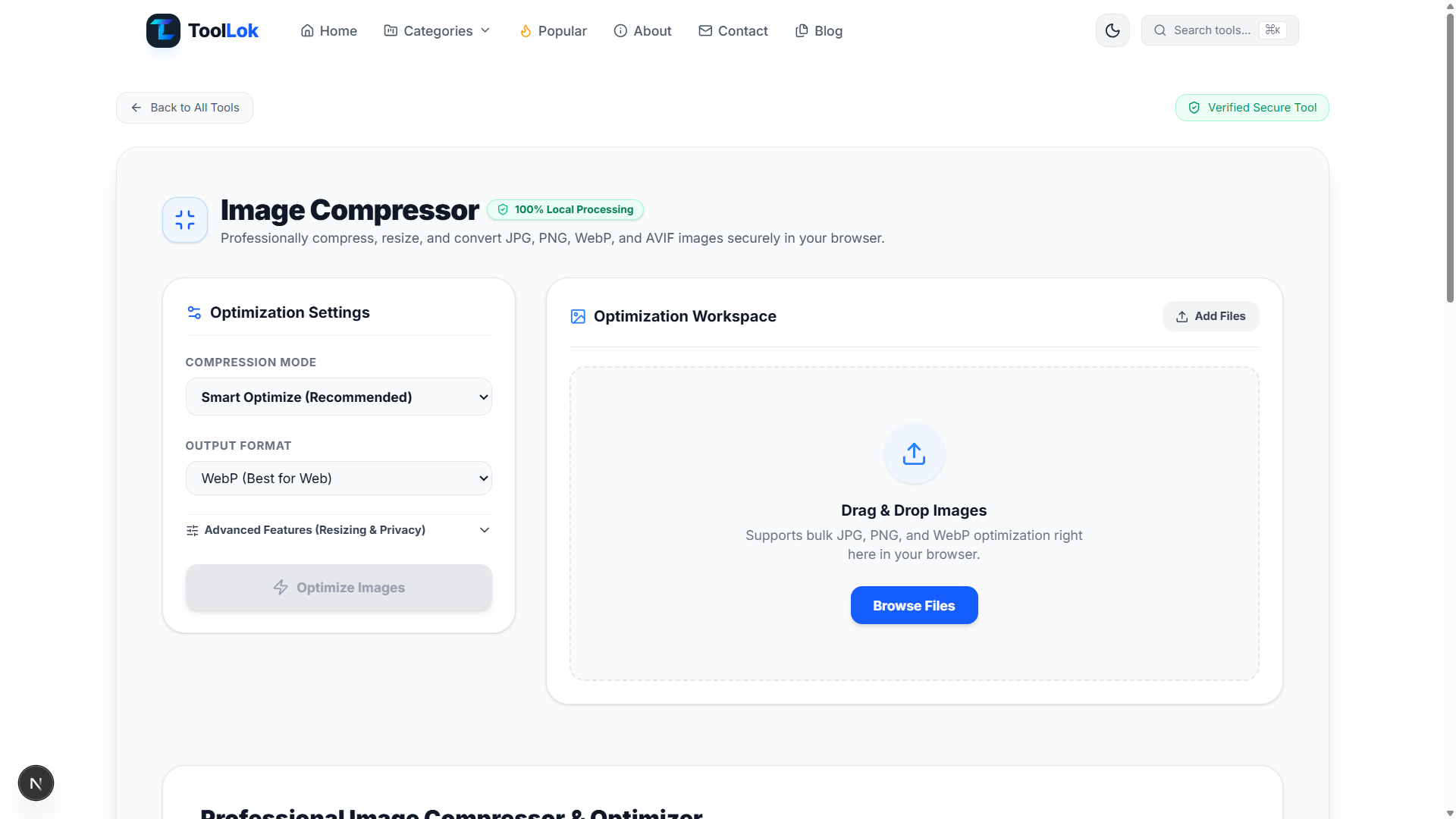
ToolLok's Image Compressor is a free browser-based image optimization tool designed to help users compress, resize, and convert images directly from their browser. It supports common image formats including JPG, PNG, WebP, and AVIF.
The tool provides a simple optimization workspace with compression settings, output format selection, image resizing options, and local browser processing. This makes it useful for developers, designers, content creators, website owners, marketers, and anyone who needs smaller optimized images.
Important: Image compression can reduce file size, but the final result depends on the original image, format, dimensions, compression settings, and visual complexity. Always review the optimized image before publishing important content.
What Is an Image Compressor?
An image compressor is a tool that reduces the file size of an image while attempting to preserve as much visual quality as possible. Image compression is commonly used to make websites faster, reduce storage usage, and improve upload and download performance.
Common image formats that can benefit from optimization include:
- JPG and JPEG images
- PNG images
- WebP images
- AVIF images
- Website images
- Blog and article images
- Social media graphics
- Product images
- UI and design assets
Reducing unnecessary image file size can help improve page loading performance and make images easier to store, transfer, and share.
Why Should You Compress Images?
High-resolution images can contain significantly more data than necessary for their intended use. For example, an image uploaded to a website may be much larger than the dimensions actually displayed on the page.
Image compression and resizing can help:
- Reduce image file size.
- Improve website loading performance.
- Reduce bandwidth consumption.
- Make image uploads faster.
- Save storage space.
- Optimize images for websites.
- Prepare images for online publishing.
- Create more efficient image assets.
Key Features of ToolLok Image Compressor
1. Smart Image Optimization
The Smart Optimize mode provides a convenient starting point for users who want to compress images without manually adjusting every optimization parameter. It is designed as a recommended compression workflow for common image optimization tasks.
2. JPG Image Compression
JPG is one of the most widely used image formats for photographs and web images. Compressing JPG files can reduce their size and make them more suitable for websites, blogs, online stores, and digital content.
3. PNG Image Compression
PNG images are commonly used for graphics, screenshots, interfaces, logos, and images requiring transparency. The Image Compressor supports PNG optimization as part of its browser-based image workflow.
4. WebP Conversion and Optimization
WebP is a modern image format commonly used for websites because it can provide efficient image delivery while maintaining good visual quality. ToolLok allows users to select WebP as an output format for image optimization.
5. AVIF Image Support
AVIF is another modern image format designed for efficient image compression. Supporting AVIF gives users another option when optimizing images for modern web applications and digital experiences.
6. Image Resizing
Image dimensions can have a major effect on file size. Resizing an image to dimensions closer to its actual display size can remove unnecessary pixels and create a more efficient image asset.
This is particularly useful when preparing large photographs or graphics for websites, blogs, dashboards, and online content.
7. Multiple Image Processing
The Image Compressor provides an optimization workspace designed for working with multiple images. Users can add image files through the Browse Files or drag-and-drop workflow instead of processing every image individually.
Bulk image optimization can be useful when preparing collections of website assets, content images, product photos, or design resources.
8. Drag and Drop Image Upload
The drag-and-drop workspace provides a convenient way to add images for optimization. Users can drop supported image files directly into the browser interface and begin the optimization workflow.
9. Output Format Selection
Choosing an appropriate output format is an important part of image optimization. ToolLok provides an Output Format setting so users can select the format that best matches their intended use.
Depending on the workflow, users can work with formats such as JPG, PNG, WebP, and AVIF.
10. Browser-Based Image Processing
ToolLok's Image Compressor is designed around local browser-based processing. This provides a convenient way to optimize images directly within the browser instead of requiring users to upload their images to a separate image-processing service.
Browser-based processing can be particularly useful when working with images that users prefer to keep within their local workflow.
11. Privacy-Focused Image Optimization
Local processing can provide an additional privacy advantage because the image optimization workflow can take place directly in the browser. Users should still review their organization's security and privacy requirements before processing sensitive or confidential files with any online application.
12. Advanced Resizing and Privacy Options
The Advanced Features section provides additional controls related to image resizing and privacy. These options are useful for users who want more control than the default smart optimization workflow.
Image Compression vs Image Resizing
Image compression and image resizing are related but different optimization techniques.
Compression focuses primarily on reducing the amount of data stored in an image file. Resizing changes the physical dimensions of the image by reducing its width, height, or both.
Combining both techniques can often produce significantly smaller images than using either technique alone.
JPG vs PNG vs WebP vs AVIF
Different image formats are suitable for different situations. Choosing the right format can have a major impact on image size and web performance.
- JPG: Commonly used for photographs and complex images.
- PNG: Useful for graphics, screenshots, and images requiring transparency.
- WebP: A modern format commonly used for efficient web images.
- AVIF: A modern format designed for highly efficient image compression.
The best format depends on the type of image, required visual quality, browser compatibility requirements, and intended destination.
How to Compress an Image Online
- Open the Image Compressor. Open ToolLok's Image Compressor in your browser.
- Add your images. Use the Browse Files button or drag and drop images into the optimization workspace.
- Select a compression mode. Choose Smart Optimize or another available optimization configuration.
- Select the output format. Choose the desired output format such as WebP or another supported format.
- Configure advanced options. Adjust available resizing and privacy-related options when necessary.
- Start optimization. Run the image optimization process.
- Review the optimized images. Check the resulting image quality and file size before using the files.
How Image Compression Helps Website Performance
Images can represent a substantial portion of the total data loaded by a web page. Large unoptimized images may increase page weight and require more time to download.
Compressing and resizing images before publishing them can create smaller assets that require less bandwidth. This can be particularly valuable for image-heavy websites, blogs, ecommerce stores, portfolios, and content platforms.
Image optimization should be combined with other performance techniques such as appropriate responsive image dimensions, efficient caching, and modern web delivery practices.
Image Compressor for Web Developers
Web developers frequently need optimized images for websites and web applications. Large images can unnecessarily increase page size, particularly when original camera or design files are used without optimization.
A browser-based image compressor for developers can provide a quick way to prepare image assets before adding them to a project.
- Optimize website hero images.
- Compress blog images.
- Prepare product images.
- Resize oversized graphics.
- Convert images to WebP.
- Prepare modern image assets.
- Reduce unnecessary image file sizes.
Image Compression for Content Creators
Content creators regularly work with photographs, thumbnails, graphics, screenshots, and promotional images. Large files can be difficult to upload, share, and store.
Compressing images before publishing can make content workflows more efficient while helping maintain an appropriate balance between file size and visual quality.
Image Compression for Websites and Blogs
Website owners and bloggers can use image compression to prepare images before adding them to articles and web pages. Optimized images can reduce unnecessary page weight and make assets easier to manage.
When publishing images, always select dimensions appropriate for the location where the image will actually appear. Uploading a very large image when a much smaller display size is required can waste storage and bandwidth.
Best Practices for Image Optimization
- Resize images to appropriate display dimensions.
- Choose a suitable image format.
- Compress large images before publishing.
- Use modern formats when appropriate.
- Review visual quality after compression.
- Avoid unnecessarily large source dimensions.
- Keep original files when they may be required later.
- Use descriptive image filenames for better asset management.
- Optimize images before uploading them to your website.
When Should You Use WebP?
WebP can be a useful choice when optimizing images for modern websites. It is designed to provide efficient image compression and is widely used as a web image format.
WebP can be particularly useful for photographs, website graphics, thumbnails, blog images, and other assets where reducing file size is important.
When Should You Use AVIF?
AVIF is another modern image format focused on efficient compression. It can be considered when your target environment supports AVIF and your workflow benefits from smaller image assets.
As with any image conversion, always compare the resulting file size and visual quality before replacing an existing image format.
Why Use a Browser-Based Image Compressor?
A browser-based image compressor provides a convenient way to optimize images without installing desktop software. Users can access the tool from a modern web browser and perform common image optimization tasks from a single interface.
ToolLok's local processing approach is also useful for users who prefer an image workflow that keeps processing within their browser.
Who Can Use ToolLok Image Compressor?
The Image Compressor is useful for anyone who regularly works with digital images.
- Web developers
- Frontend developers
- Backend developers
- UI/UX designers
- Graphic designers
- Content creators
- Blogger and website owners
- Digital marketers
- Ecommerce website owners
- SEO professionals
- Students
- Freelancers
Common Image Compression Use Cases
- Compress images before uploading them to a website.
- Resize oversized photographs.
- Convert JPG images to WebP.
- Prepare PNG graphics for online use.
- Optimize blog images.
- Reduce product image file sizes.
- Optimize website hero images.
- Prepare images for web applications.
- Reduce storage requirements for image assets.
- Optimize multiple images in a single workflow.
Image Compression and SEO
Image optimization can contribute to a better overall website performance strategy. Smaller image assets can reduce the amount of data browsers need to download and can help create a faster user experience.
However, image compression is only one part of technical SEO and website performance. Website owners should also consider responsive images, page structure, caching, accessibility, image dimensions, and other performance factors.
Why Use ToolLok's Image Compressor?
ToolLok's Image Compressor brings image compression, resizing, format conversion, and browser-based processing into one simple workspace. Users can add images, select optimization settings, choose an output format, and process their image assets from the browser.
The tool is designed to be useful for developers, designers, content creators, website owners, and anyone who wants a convenient free image compressor without installing additional software.
Conclusion
Image optimization is an important part of modern web development and digital content creation. Large image files can consume unnecessary storage and bandwidth, while appropriately compressed and resized images can create more efficient digital assets.
ToolLok's Image Compressor provides a convenient browser-based workflow for compressing, resizing, and converting JPG, PNG, WebP, and AVIF images. Its Smart Optimize workflow, output format selection, drag-and-drop workspace, bulk image workflow, and advanced resizing options make it useful for a wide range of image optimization tasks.
Whether you are optimizing website images, preparing blog content, reducing product image sizes, converting images to WebP, or preparing assets for a web application, ToolLok provides a simple way to optimize your images directly in your browser.
Compress, resize, and optimize your images with ToolLok's free Image Compressor.